
Firefighter Job with Team Fire System
$15.00
Extinguish fires as a crew and split rewards by damage done
Instant digital delivery
FiveM script
QBCore scripts that plug straight into a qb-core server, from job systems and heists to shops, garages and player-owned businesses. Most run on ox_lib and ox_inventory, and the ones that touch money hook into qb-banking and qb-management so payouts land where players expect. Pick what fits your economy and drop it into your resources folder.

Extinguish fires as a crew and split rewards by damage done

Addon pepper spray that paralyses the target on hit

Loot random NPC vehicles with synced, class-based loot tables
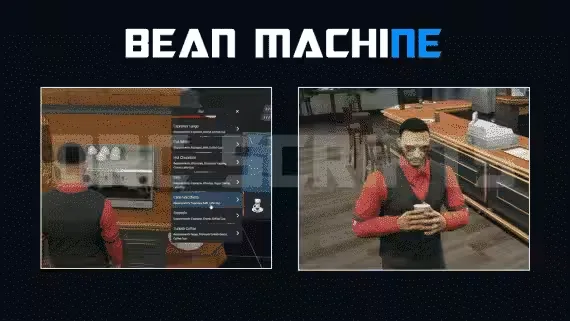
57 items, 40 delivery drops, cook and run the whole coffee shop
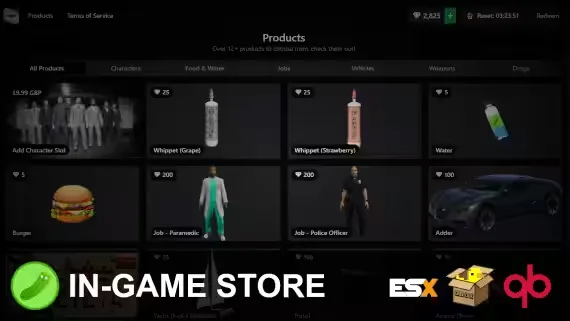
Players buy Tebex packages in-game with checkout as fast as 5 seconds
QBCore is the framework most FiveM roleplay servers actually run, so the script you pick has to speak its language. That means qb-core exports, Player.Functions for money and items, metadata that survives a relog, and jobs that read from shared/jobs.lua instead of some parallel system you have to maintain by hand. Every script on this page is built for that world. You install it, point the config at your jobs and items, and it behaves like it belongs on your server.
The catalog covers the categories a QBCore server leans on. Job scripts for police, EMS, mechanic and the civilian grind. Heists and robberies with cooldowns, dispatch alerts and item requirements. Economy pieces like player-owned shops, dealerships and businesses that pull from qb-banking. HUDs and inventories in a NoPixel-style layout. Whatever the mechanic, the point is the same: it should feel native, not bolted on.
PlayerData structure. A script written for a 2021 export map will throw nil errors on a fresh server.Everything here is written for QBCore, and a good number also ship an ESX or Qbox path in the same download, so check the product page if you run more than one framework. The common shared dependencies are ox_lib for menus and callbacks and ox_inventory or qb-inventory for items. Money and society accounts route through qb-banking and qb-management on most economy scripts.
Installation follows the pattern QBCore owners already know. Drop the resource into your resources folder, add the SQL if the script stores data, add ensure resource-name to your server.cfg, then open the config and set your jobs, item names and coordinates. Scripts that add items include the items.lua entries you paste into qb-core or ox_inventory, and the ones with a UI ship the images alongside. If a script needs a specific dependency load order, the docs say so. Read them once and you avoid the console errors that come from ensuring things in the wrong sequence.
Before you go live, test on a local server. Spawn in, run the job or trigger the heist, relog to confirm metadata and inventory persist, and watch resmon while a few players hammer it. QBCore scripts fail most often at the seams, where a script expects an item or a society account you have not created yet, so a five minute test catches the small config gaps.
We run QBCore servers, so we buy and test these scripts the way you do. Each product page lists the framework it targets, the dependencies it needs, whether it is escrow or open source, and the real feature set instead of a wall of buzzwords. You get the exact files on release, update access when the creator ships a fix, and enough detail up front to know it fits your build before you spend a credit. If you run a QBCore roleplay server and want jobs, heists and an economy that actually connect to your framework, this is the collection to start from.
They are FiveM resources built for the QBCore framework, using qb-core exports for money, items, jobs and metadata. This covers job systems, heists, HUDs, inventories and player-owned businesses. Because they read from qb-core directly, they behave like a native part of your server instead of a separate add-on.
Most do. ox_lib is a common dependency for menus, callbacks and notifications, and many scripts support ox_inventory alongside qb-inventory. Each product page states which inventory it targets, so match that to what your server already runs before you install.
Some ship an ESX or Qbox version in the same download, others are QBCore only. Qbox is a QBCore fork so compatibility is often close, but you should still check the product page. Do not assume a QBCore script drops cleanly onto an ESX server without a supported build.
Drop the resource into your resources folder, import any included SQL, and add ensure resource-name to your server.cfg. Then open the config to set jobs, item names and coordinates, and paste any new items into qb-core or ox_inventory. Restart the server and test the feature before going live.
Both exist in the catalog. Escrow scripts are protected by CFX and lock the core files, while open source scripts let you read and edit everything. Each product page marks which you are buying, so check before purchase if you need to patch conflicts or read the logic yourself.
Yes, resmon matters on a full server. A job loop or HUD that idles low on an empty box can climb with 48 players online. Look for a stated resmon figure on the product page and test the script under load on your own server before you commit to it.